

Install and use WeChat & AliPay apps
标签:
Heading to the China Flow Retreat? Two apps are absolutely essential for daily life in China: WeChat (微信) and Alipay (支付宝). From paying for meals and taxis to scanning QR codes and communicating with locals, these apps are used for virtually everything. Cash is rarely accepted in modern China.
In this guide, we’ll walk you through installing both apps, setting up your accounts, and getting ready to pay — all before you arrive. Follow these steps at home so you’re ready to go the moment you land. 🇨🇳
📱 WeChat — messaging, payments, and social media (China’s “everything app”)
💰 Alipay — mobile payments, transport tickets, and money transfers
⏱️ Setup time: 15–30 minutes per app
📋 You’ll need: Phone number, passport, and an international bank card (Visa/Mastercard)
📱 CHAPTER 1 — HOW TO REGISTER A WECHAT ACCOUNT
WeChat (微信, Wēixìn) is China’s super-app — used for messaging, social media, payments, booking taxis, ordering food, and much more. Over 1.3 billion people use it daily. You’ll need it from the moment you arrive.
Step 1 — Download the Official WeChat App
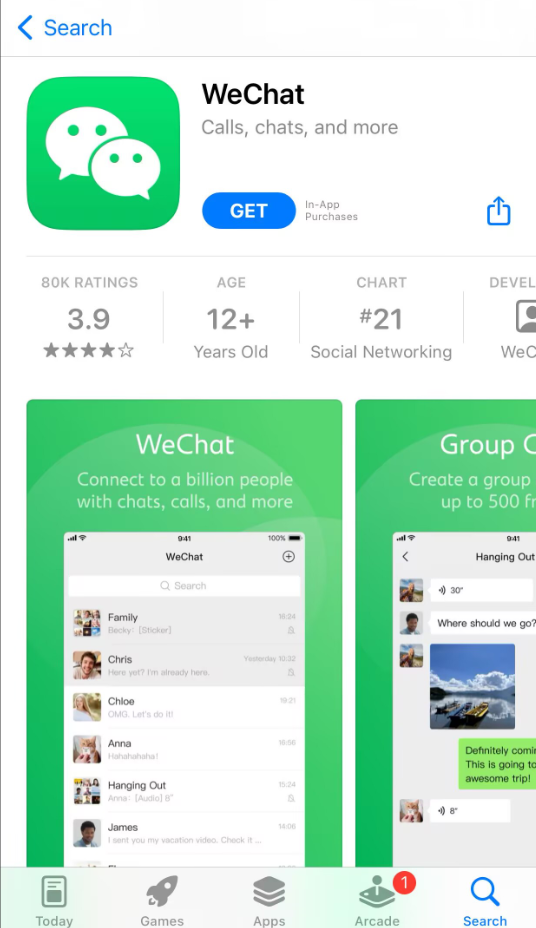
Search for “WeChat” in the App Store (iOS) or Google Play (Android). Make sure you download the official app by WeChat (Tencent).
The app is free and available worldwide.
📥 iOS: Apple App Store
📥 Android: Google Play
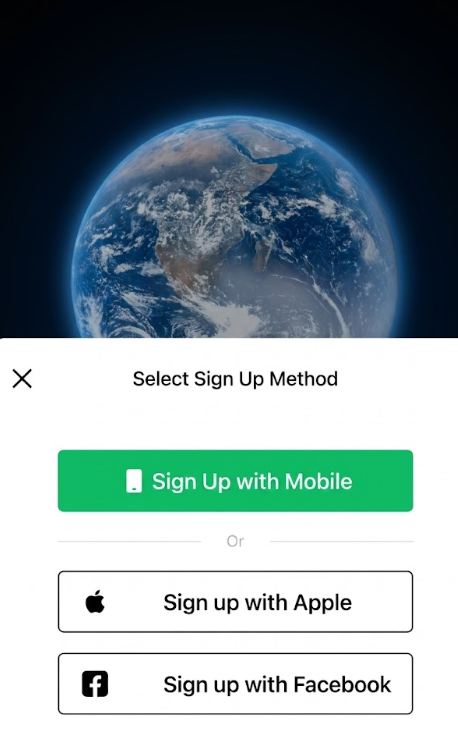
Step 2 — Open the app and tap “Sign Up”
We strongly recommend “Sign Up with Mobile”. Signing up with Apple or Facebook still requires a phone number and adds extra steps.
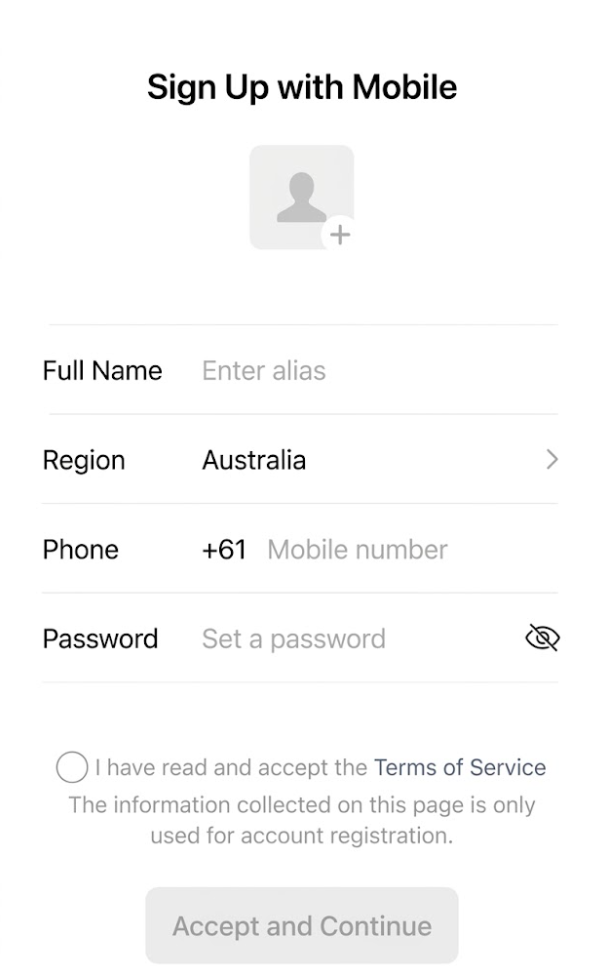
Step 3 — Fill in your details:
- Nickname — editable later
- Region — auto-matches your country code
- Mobile number — must be able to receive SMS. Confirm it matches your selected region/country code
- Password — 8–16 characters, mix of letters and numbers
Check the terms box and tap “Accept and Continue”.
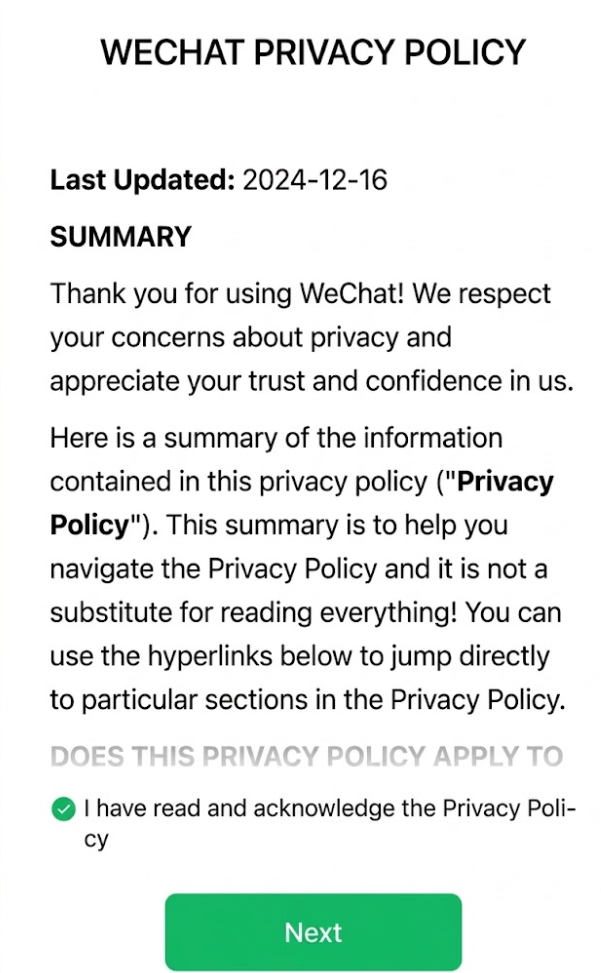
Step 4 — Read and Accept the Privacy Policy
Read the privacy policy summary, check the acknowledgment box, and tap “Next”.
Step 5 — Complete Verification
Complete the human verification (slider or image check). Enter the 6-digit verification code sent to your phone via SMS and tap “Submit”.
💡 Tip: If you don’t receive the SMS within 2 minutes, check that your country code is correct and that your phone can receive international messages.
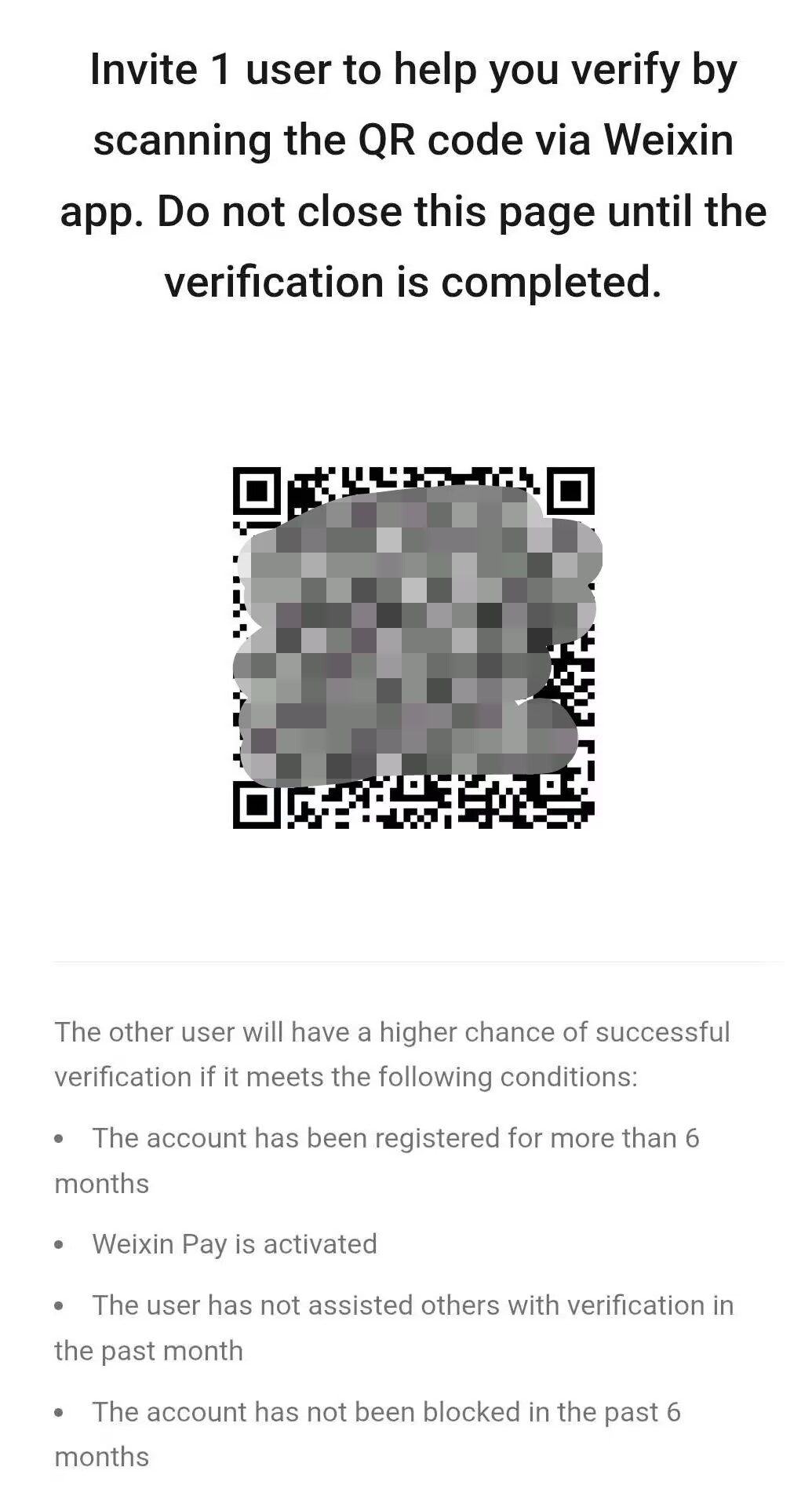
Step 6 — Friend Assistance Verification (Mandatory)
This is the trickiest step. WeChat requires an existing WeChat user to scan your QR code and verify your registration.
The person helping you must meet these conditions:
- Account registered for more than 6 months
- Weixin Pay is activated
- Has not assisted another user with verification in the past month
- Account has not been blocked in the past 6 months
💡 Tip: Ask someone who lives in China or regularly uses WeChat. The retreat team can assist you if needed — just reach out to us!
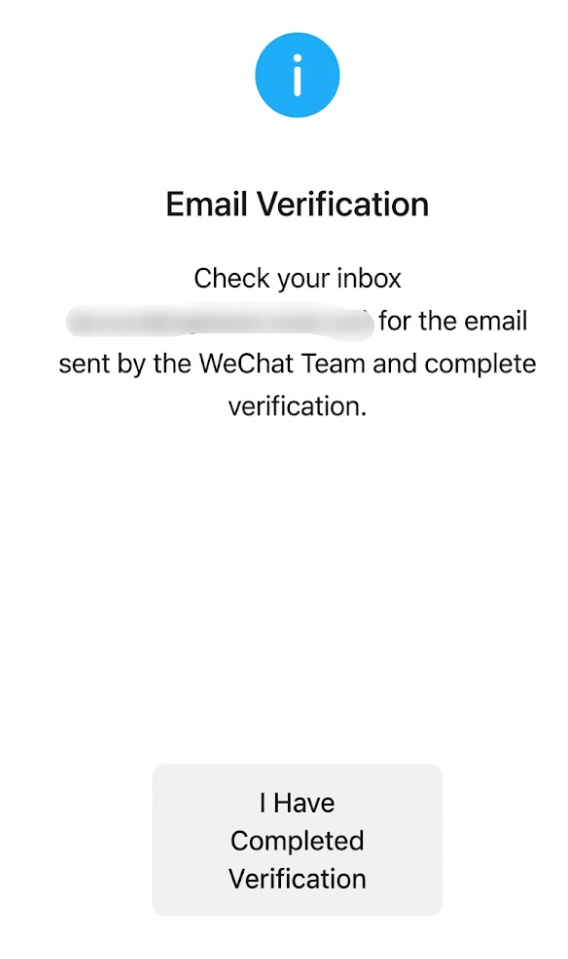
Step 7 — Email Verification (Optional but Recommended)
Verify your email address for account recovery. This helps you recover your account if you forget your password or change your phone number.
Check your inbox for the email sent by the WeChat Team and complete the verification.
Select which Weixin services to enable and tap “Done”.
🎉 Congratulations — your WeChat account is ready!
Need Help with WeChat?
If you encounter any issues during registration, visit the official WeChat Help Center:
📞 WeChat Pay / International Customer Service Hotline: 95071
📞 Dialing from Overseas: +86 571 95017
💰 CHAPTER 2 — HOW TO SET UP WECHAT PAY
Once your WeChat account is active, you can enable WeChat Pay — the most widely accepted mobile payment method in China. Here’s how to set it up with your international bank card.
Before You Start — What You Need
- ✅ Valid Passport (not expired) — required for identity verification (eKYC)
- ✅ International Mobile Number — must be able to receive SMS (enable international roaming if needed)
- ✅ Latest WeChat App — update to the latest version on iOS or Android
- ✅ Supported International Card — Visa, Mastercard, JCB, Discover, Diners Club, or American Express. Both credit and debit cards work, but prepaid/virtual cards are generally not accepted
⚠️ Important: Call your bank before traveling to China and inform them you’ll be making small e-commerce payments via WeChat Pay. Many banks’ fraud systems automatically block these transactions.
Step 1 — Enable WeChat Pay
If you don’t see the “Wallet” option in WeChat, you need to enable it manually:
- Go to Me → Settings → General → Tools → WeChat Pay
- Tap “Enable” to turn on the feature
- Return to Me → Services — you should now see “Wallet”
Step 2 — Real-Name Authentication
Path: Me → Services → Wallet → ID Info → Real-Name Authentication
- Select “Passport” as your ID type
- Fill in your personal details exactly as they appear on your passport (name, gender, nationality, passport number, expiry date)
- Upload a clear photo of your passport’s data page (all four corners visible, no glare, all text legible)
- Complete the face verification in a well-lit environment, facing the camera directly
- Wait 1–2 minutes. You’ll see “Verified” once authentication is successful
💡 If face verification fails: ensure sufficient lighting, remove masks/hats/sunglasses, and make sure the name you entered matches your passport exactly (including name order and middle names).
Step 3 — Add an International Bank Card
Path: Me → Services → Wallet → Bank Cards → Add a Bank Card
- Tap “Add a Bank Card” — enter the card number manually or use the camera to scan it
- Select your issuing bank, then enter your card number, expiry date, and CVV
- Fill in your billing address exactly as it appears on file with your bank (this can be your home address in your own country)
- Receive and enter the SMS verification code sent by your bank
💡 Key tips:
- The cardholder name must match your passport exactly — including capitalization, spelling, and name order
- Make sure your card has 3-D Secure (3DS) and international payment features enabled
- Supported networks: Visa, Mastercard, JCB, Discover, Diners Club, American Express
Step 4 — Set Your Payment Password
Path: Wallet → Payment Settings → Payment Password
- Tap “Set Payment Password” and enter a 6-digit numeric PIN
- Re-enter the password to confirm
💡 Some banks may make a small verification charge (~¥0.1–1 RMB). This will be automatically refunded.
Step 5 — How to Use WeChat Pay
Method 1 — Show Your Payment QR Code (Most Common)
Path: Me → Services → Pay/Receive Code
Show the QR code to the cashier. They scan it with their device, and you enter your payment password. Done!
⚠️ The payment QR code refreshes every minute. Never share a screenshot of it with anyone.
Method 2 — Scan the Merchant’s Code
Path: Tap the “+” icon (top right) → Scan
Scan the merchant’s QR code, enter the payment amount, confirm, and enter your password.
Important Rules & Limitations
💸 Transaction Fees
New users may qualify for a 60-day fee waiver on transactions up to ¥1,000/day after their first payment. After that, standard rates apply. Your home bank may also charge a foreign transaction fee (1–3%) on top.
🚫 Features NOT Available for Foreign Card Users
- ❌ Sending red packets (红包) to WeChat friends
- ❌ Transferring money to WeChat friends
- ❌ Group collection / split bills
- ❌ Purchasing WeChat wealth management products
These features require a mainland Chinese bank account.
💙 CHAPTER 3 — HOW TO INSTALL & USE ALIPAY
Alipay (支付宝, Zhīfùbǎo) is China’s other essential payment app. While WeChat Pay is more common for social payments, Alipay is widely accepted at shops, restaurants, transport, and online services. Many places accept both, so it’s smart to have both set up as a backup.
Great news: Alipay’s international version has a fully English interface and is specifically designed for tourists visiting China.
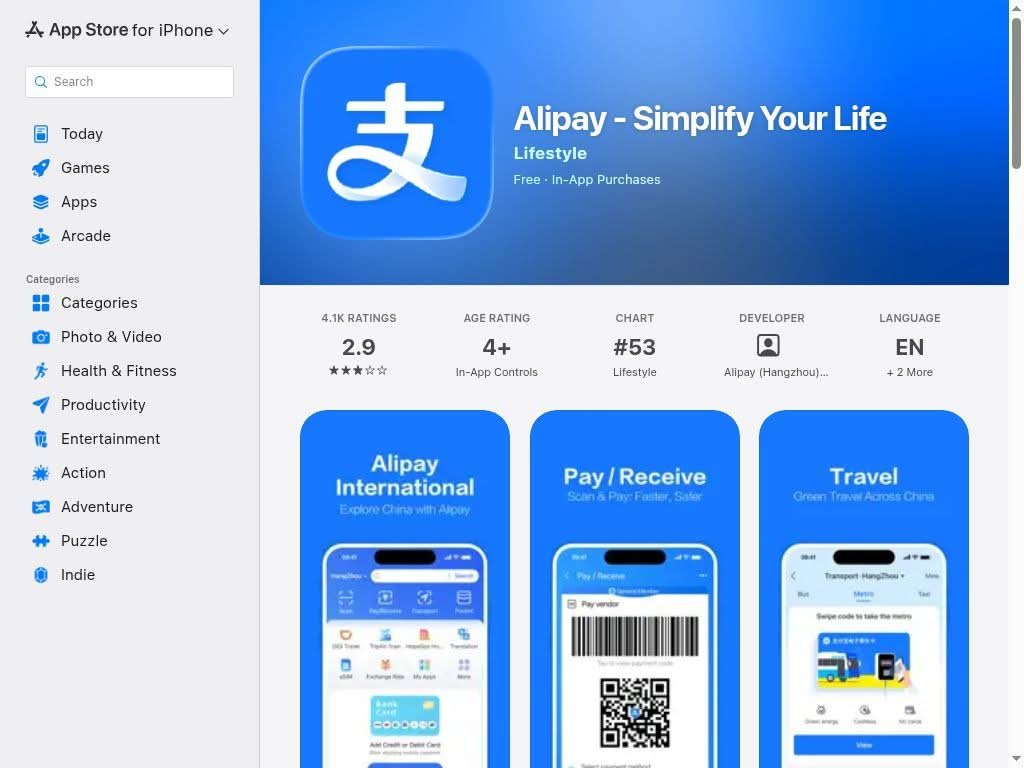
Step 1 — Download the Alipay App
Search for “Alipay” in the App Store or Google Play. The official app is called “Alipay – Simplify Your Life” by Alipay (Hangzhou).
📥 iOS: Apple App Store
📥 Android: Google Play
💡 Tip: The app is free. Make sure you download the main Alipay app, not “Alipay HK” or regional versions.
Step 2 — Create Your Account
- Open the app and tap “Sign Up”
- Select your country/region and enter your phone number
- Enter the verification code sent via SMS
- Set a login password
💡 Tip: Use the same phone number you used for WeChat. Make sure international SMS is enabled on your phone plan.
Step 3 — Identity Verification (Tour Pass)
Alipay offers a “Tour Pass” feature designed specifically for international visitors:
- Open Alipay and search for “Tour Pass” in the search bar, or find it on the home screen
- Tap “Get Started”
- Select “Passport” as your ID type
- Take a clear photo of your passport data page
- Complete facial recognition verification
- Wait for approval (usually instant to a few minutes)
💡 The Tour Pass lets you load money and pay at millions of merchants across China without needing a Chinese bank account.
Step 4 — Add Your International Bank Card
- Go to Me → Bank Cards → Add Card
- Enter your card number, expiry date, and CVV
- Fill in your billing details as registered with your bank
- Verify with the SMS code from your bank
Supported cards: Visa, Mastercard, JCB, American Express, Discover, Diners Club
⚠️ Important: Just like with WeChat Pay, inform your bank before traveling that you’ll be making mobile payments in China.
Step 5 — How to Pay with Alipay
Method 1 — Show Your QR Code
Tap “Pay” on the home screen to display your payment QR code. The merchant scans it, and the payment goes through automatically.
Method 2 — Scan the Merchant’s Code
Tap “Scan” on the home screen, point your camera at the merchant’s QR code, enter the amount, and confirm payment.
Method 3 — In-App Payments
Many Chinese apps and websites accept Alipay as a payment method. Simply select Alipay at checkout and confirm in the app.
Useful Alipay Features for Your Trip
- 🚕 DiDi (Ride-hailing) — Book taxis directly through Alipay’s mini-program
- 🚇 Transport QR Codes — Scan to ride metro and buses in many Chinese cities
- 🌐 Translation — Built-in translation tools for menus and signs
- 💱 Exchange Rates — View real-time currency conversion rates
- 🏪 Store Locator — Find nearby shops, restaurants, and ATMs
✅ FINAL TIPS BEFORE YOU GO
-
Install both apps at home — Don’t wait until you arrive in China. Google Play and some Western services are blocked there
-
Enable a VPN before you go — You’ll need it for Gmail, WhatsApp, Instagram, and Google Maps while in China
-
Notify your bank — Tell them you’ll be making small mobile payments in China to avoid your card being flagged for fraud
-
Carry some cash (RMB) as backup — While mobile pay covers 99% of situations, a few rural shops may still prefer cash
-
Get a Chinese SIM card at the airport — Having local mobile data makes everything smoother
-
Keep your phone charged! — Without your phone, you can’t pay for anything. Bring a power bank (make sure it has the China Compulsory Certification “CCC” mark. Without this certification, your power banks could be confiscated at security! Additionally, make sure that your power banks are under 100W)
With WeChat and Alipay set up, you’re fully prepared for daily life in China. If you need any help during setup, don’t hesitate to reach out to our retreat team. We’re here to help!


[…] Install & Use WeChat & Alipay […]
[…] MY TICKET Blog Install and use WeChat & AliPay apps – China Flow Retreat Install and use WeChat & AliPay apps – China Flow Retreat Tags: App installation China […]
[…] Install WeChat & Alipay — Essential apps for China […]